Maecenas sollicitudin

California, United States.

Tag title

Autem vel eum iriure dolor in hendrerit in vulputate velit esse molestie consequat, vel illum dolore eu feugiat nulla facilisis at vero eros et dolore feugait.

Tag Archive deco xe75

tplink deco xe75

Deco XE75 vs Asus BD5 Which One Gives You Better Value

Tp-link released two products in the middle class network segment based on wifi 6e technology, deco xe75 with 6GHz band. How good this product is compared with Deco BE25 and how this product will compete with Asus BD5 wifi 7?

In this article:

What this Deco xe75 does

Wifi 7 products have been around on the market; however the previous models of wifi 6 and 6e products are still available in the market and they are still worth of buying. In the middle range of wifi 6e, deco introduced Deco xe75 and deco xe75 pro. The deco xe75 pro comes with 2.5Gbps WAN port, while the XE75 comes with 1.0 Gbps WAN port. The other name for xe75 is deco xe5300, which is for Costco wholesale.   

Deco X75

Deco xe75 vs Deco x5700

Previously TP-link introduced Deco x5700 series which is not as popular as xe75, but it offers higher total bandwidth than xe75. Both series are products with three radio bands; however deco xe75 comes with three distinct radio bands including 6GHz in addition to 5GHz and 2.4GHz bands. The latest wifi 7 standards come with 6GHz radio bands, so does wifi 6e. However, wifi 7 standards support MLO (Multi-link operations) which allows all the available bands to be aggregated for faster data throughput. Moreover, the channel bandwidth can go up to 320Mhz for fastest data transmission.

See also Deco xe75 vs Asus et8, products with the same wifi6e standards.

Backhaul link

Deco xe75 is designed by default to use @6ghz band as dedicated backhaul link between nodes. So, if you have connected devices that require connection to 6GHz band, you need to change the default setup. Enable this 6GHz band accessible by 6GHz-connected devices.

Change this radio band with an adequate SSID name as the @6GHz radio band so that your 6GHz-enabled devices can search and connect to this band. In wifi settings select the 6GHz dedicated backhaul => Main network => select Wi-fi network, the default SSID name is Deco_6GHz, you need to give the password for security reason.

On the other hand, deco x5700 comes with 2x 5GHz radio bands in addition of 2.4GHz band, you need to select one of them as dedicated backhaul. For future compatibility, choosing deco x75 is more advantage because your router is ready with 6GHz connected devices.

Spec comparison table Deco xe75 vs x5700

Have a look at the following spec comparison table 1 between Deco xe75 and Deco x5700.

Table 1 Deco xe75 vs Deco x5700

Deco modelDeco xe75 ProDeco x5700
Wifi technologytri-band axe5400 wifi 6e with AI driven meshtri-band ax5700 0 wifi 6 with AI driven mesh
Signal rates574Mbps @ 2.4GHz; 2×2;
2402 Mbps @ 5GHz; 2×2;
2402 Mbps @ 6 GHz 2×2;
574Mbps @ 2.4GHz; 2×2;
1201 Mbps @ 5GHz; 2×2;
3843 Mbps @ 5 GHz 4×4
Ethernet Ports1x 2.5Gbps
2x Gigabit Ethernet Ports WAN/LAN auto sensing
1x 2.5Gbps WAN/LAN port;
1x 1.0Gbps LAN port
BackhaulDefault is dedicated backhaul @6GHz  and optional wired Ethernet backhaulSelectable dedicated backhaul @5GHz either @1200Mbps or @3843 Mbps Optional wired Ethernet backhaul
Processor 1.7 GHz Quad core CPU1.5 GHz Quad core CPU
Dimension 4.1 x 4.1 x 6.7 in (105 x 105 x 169 mm)5.1 x 4.8 x 8.3 in (130 x 123 x 210 mm)           
Price$269.99 (2-pack)$379.99  (2-pack)

Both Deco x75 pro and deco x5700 come equipped with multi-gig internet port 2.5Gbps, you can enable to support multi-gig cable modem such as Surfboard S33 or Netgear CM2000 that comes with 2.5Gbps port.

Deco XE75 Pro vs Deco BE25

Wifi 7 standards have been around and most networking vendors adopt this new standard into their products. TP-Link is the pioneer in releasing wifi-7 products into the market. one of the lower level of wifi7 products is Deco be25.

Different generation

So, when it comes to decide which one to choose between deco xe75 and new deco be25? What does this two products set apart? The apparent difference is wifi generation. Deco xe75 comes with previous wifi 6e standards, while the new deco be25 comes with newest wifi 7 standards.

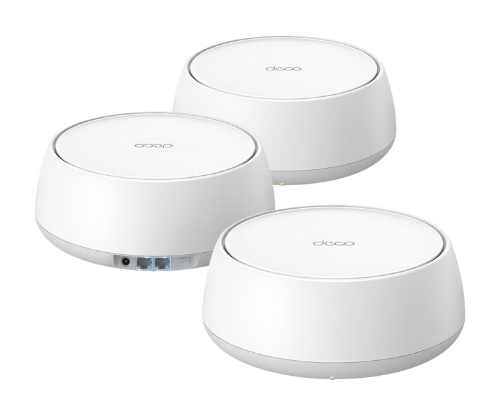
Deco BE25

In terms of bandwidth capacity, technically deco xe75 offers wider bandwidth capacity than be25. Xe75 offers 6GHz band that is used as cleaner backhaul link between the nodes. On the other hand, deco be25 doesn’t come with 6GHz band. However, be25 that is configured with wired backhaul, will demonstrates aggregated wired and wifi backhaul with its MLO feature.

Deco xe75 vs be25 comparison table

Both deco xe75 pro and deco be25 supports multi-gig 2.5Gbps internet services. Take a closer look at the following spec comparison table below. 

Table 2 comparison table xe75 pro vs be25

Deco modelDeco xe75 ProDeco BE25
Wifi technologySimultaneous tri-band axe5400 wifi 6e with AI driven meshSimultaneous dual-band BE5000 AI-driven mesh
Signal rates574Mbps @ 2.4GHz; 2×2;
2402 Mbps @ 5GHz; 2×2;
2402 Mbps @ 6 GHz 2×2;
688 Mbps @ 2.4GHz; 2×2;
4,324 Mbps @ 5GHz; 2×2;  
Ethernet Ports1x 2.5Gbps
2x Gigabit Ethernet Ports WAN/LAN auto sensing
2x 2.5Gbps WAN/LAN port;  
BackhaulDefault is dedicated backhaul @6GHz  and optional wired Ethernet backhaulAggregated wifi and wired backhaul
Processor 1.7 GHz Quad core CPU Unspecified
Dimension 4.1 x 4.1 x 6.7 in (105 x 105 x 169 mm) 150 mm x 150 mm x 62 mm
Price$269.99 (2-pack)$229.99  (2-pack)

Price gap between the two product series is not too large, just slightly difference. With the absence of 6GHz band which is the nature of wifi7, deco xe75 pro is more advantage than be25.

Deco Xe75 vs Asus BD5

Asus introduces various models of wifi7 products, including Asus BT10 that becomes main competitor for Deco be75 in the middle range wifi7 products, and in the lower end product, you can find Asus BD5 which competes tightly with deco be25. See also comparison between Asus BD5 and Deco be25, product comparison between low end wifi7 products. 

Asus BD5

The price gap between the two products is very small; you can say they are tagged at the same price. So, which one is better value, the previous wifi 6e product or the latest wifi7 one?    

Different generation

The main apparent difference is that they come in different wifi generations. Xe75 pro comes designed with previous wifi 6e with three distinct radio bands including 6GHz band. On the other hand, Asus BD5 comes designed with latest wifi7 standards, but it doesn’t include the 6GHz band.  

Wired backhaul

Both of these product models also provide a wired backhaul option in addition to wifi backhaul. The addition of the wired backhaul option is very useful considering that the wired connection is resistant to all interference signals. And both systems can provide auto signal path the best used for backhaul links with this wired backhaul configuration.

Multi-Gig WAN port

Internet services is getting better and faster, and most recent additions of DOCSIS 3.1 cable modems come with 2.5Gbps Ethernet port. Both deco xe75 pro and Asus bd5 come equipped with 2.5Gbps WAN port, so you can connect to high speed cable modem such as Surfboard S33 or Netgear CM2000.

Table 2 below shows you more details spec difference between deco and asus with wifi 6e technology.

Table 2 TP-link Deco xe75 vs Asus ET8

ModelDeco xe75 ProAsus BD5
Wifi technologytri-band axe5400 wifi 6e with AI driven meshDual band be5000 wifi 7
Signal rates574Mbps @ 2.4GHz; 2402 Mbps @ 5GHz; 2402 Mbps @ 6 GHz4324 Mbps @5GHz ; 688 Mbps @2.4GHz
Antennas 4x internal antennas
Ethernet Ports1x 2.5Gbps 2x Gigabit Ethernet Ports WAN/LAN auto sensing2x 2.5Gbps WAN/LAN auto sensing
USB PortsN/AN/A
BackhaulWifi @6GHz dedicated backhaul and optional wired Ethernet backhaulWifi and optional wired backhaul
Processor 1.7 GHz Quad core CPU1.5GHz quad core processor with 512MB RAM and 128 MB flash
Dimension 4.1 x 4.1 x 6.7 in (105 x 105 x 169 mm)140 x 70 x 140 mm
Price (May 20, 2022)$269.99 (2-pack)$249.99 /2-pack

Now you can make up your mind which one is suitable to meet your business need. Click the product’s link below to read more details and see current price in Amazon (#ads).

Click here to SHOP Deco X75 pro On Amazon(#Ads)

OrClick here to SHOP Asus BD5 On Amazon (#Ad)

Related products

Forwifi 6e routers, you may also like to see this Netgear raxe500 and Asus axe11000, see how these two router products are compared, which one is better value.

 Deco PX50 powerline mesh wifi, is another method of wired backhaul link between mesh nodes using existing electricity power line.

Deco XE75 vs Asus ET8 vs Linksys Which One is Best Value

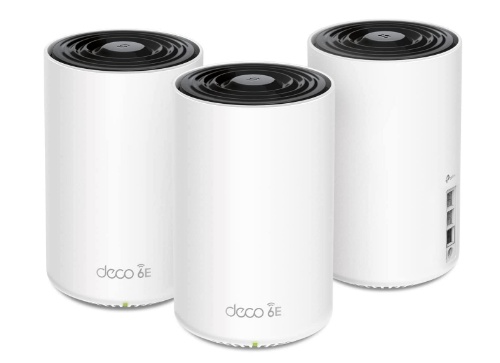
TP-link introduced deco xe75, deco xe5300 and deco xe75 pro axe5400. Which one is best value between deco xe75 pro, asus et8 and linksys atlas max?

In this article:

Deco wifi 6e series

Netgear has released mesh wifi 6e product with orbi rbke963 which is a premium one and works on the axe11000 network segment, so have asus and linksys. Asus also released a similar product in the medium network segment with its asus et8 series.

What about TP-Link that frequently offers more affordable products as opposed to its opponent: Netgear, Asus, or Linksys?

Middle tier network segment

Unlike netgear, linksys and asus, tplink precisely released wifi 6e-based product by targeting the medium network segment and at a more economical price than premium class products.

TP-Link Deco XE75

This is a make sense strategy considering that those folks who want to taste wifi 6e technology with its 6GHz radio band don’t have to spend more bucks with premium products. They include Orbi rbk963 which is the first quad band product, Linksys atlas max 6e, or Asus. For this reason, tplink released deco xe75 and deco xe75 pro series that sit at ax5400 network segment. In addition of those two series of xe5400, tplink added another model with its deco xe5300 series. With this middle range network segment products, you can work and play, including gaming and video streaming. See also video streaming and webcam products Logitech meetup vs jabra panacast.

Deco xe75 vs Deco xe5300

What is the difference between Deco xe5300 and Deco xe75? They are exactly the same technically, only slightly difference on the top of the body.  

If the specs are exactly the same why are they use different model names? Deco xe5300 is a series model for Costco wholesale, while deco xe75 is for other retail shops, although Amazon sells both models of these two deco series.

What about deco xe75 and xe75 pro? Exactly the same except that the pro version comes with multi-gig 2.5Gbps wan/lan port instead of 1.0Gbps port.

Deco xe75 vs Deco x90

Previously TP-link introduced deco x90 series which was so popular with higher total bandwidth than this deco wifi 6e series.

When should you select deco x90 instead of deco xe75 or deco xe5300? You can refer to the following spec comparison table below to get a better insight of these two products.

Both series are products with three radio bands; however deco xe75 comes with three distinct radio bands with an additional 6GHz in addition to two radio bands 5GHz and 2.4GHz. Today you can find adapter devices that come equipped with wifi 6e standards such as tp-link archer txe75e (pci-e based adapter) you can install on desktop computers. If you prefer the USB adapters, you can select Archer TXE50UH AXE3000 or the faster one is Archer TXE70UH axe5400 wifi 6e adapters.

If none of the devices in your home support wifi 6e (@6GHz) is it still worth buying a wifi6e-based router?

@6GHz radio band

Deco xe75, xe75 pro and deco xe5300 come by default to use @6ghz as dedicated backhaul link between nodes. If so, how can wifi 6e-based devices connect to @6GHz radio band if this band is used as dedicated backhaul?

To take advantage of the 6 GHz radio band connection, you need to enable this radio band so that it is accessible by compatible devices by changing the @6ghz radio band not as a dedicated backhaul. Change this radio band with an adequate SSID name as the @6GHz radio band so that your wifi6e devices can search and connect to this 6 GHz radio band.

Change default backhaul 

In wifi settings select the 6GHz Dedicated backhaul => Main network => select Wi-fi network (you can see the default is “Dedicated backhaul”). Default SSID name is Deco_6GHz, you need to give the password for security reason.

If there is no wifi 6e client, you should leave the @6GHz radio band as dedicated backhaul (leave it by default), so that the communication link between nodes is clean from all signal interference.

On the other hand, with deco x90 comes with two 5GHz radio bands you can select which one is used as dedicated backhaul. If your system comes with three units of deco x90, you may select 5GHz band @4808Mbps as dedicated backhaul for wider bandwidth communication between nodes.

For future compatibility, choosing deco xe75 is more advantage because your router is ready with wifi 6e-based connected devices. And when the requirement of multi-gig internet exists, deco xe75 pro series is preference, however the price is more costly when you compare it with standard xe75 series.

Spec comparison table Deco xe75 vs x90

Have a look at the following spec comparison table 1 between Deco xe75 and Deco X90.

Table 1 Deco xe75 vs Deco x90

Deco modelDeco xe75Deco x90
Wifi technologySimultaneous tri-band axe5400 wifi 6e with AI driven meshSimultaneous tri-band ax6600 0 wifi 6 with AI driven mesh
Signal rates574Mbps @ 2.4GHz; 2×2;  2402 Mbps @ 5GHz; 2×2;  2402 Mbps @ 6 GHz 2×2;574Mbps @ 2.4GHz; 2×2; 1201 Mbps @ 5GHz; 2×2;  4804 Mbps @ 5 GHz 4×4
Ethernet Ports3x Gigabit Ethernet Ports WAN/LAN auto sensing1x 2.5Gbps WAN/LAN port; 1x 1.0Gbps LAN port
BackhaulDefault is dedicated backhaul @6GHz  and optional wired Ethernet backhaulSelectable dedicated backhaul @5GHz either @1200Mbps or @4804 Mbps Optional wired Ethernet backhaul
Processor 1.7 GHz Quad core CPU1.5 GHz Quad core CPU
Dimension 4.1 x 4.1 x 6.7 in (105 x 105 x 169 mm)5.1 x 4.8 x 8.3 in (130 x 123 x 210 mm)           
Price$159.99 (2-pack)$174.99  (2-pack)

However, if you need wider internet bandwidth than 1Gbps, deco xe75 doesn’t support multi-gig internet speed but xe75 pro does. Deco x90 comes with 2.5Gbps WAN port you can enable to support multi-gig cable modem such as Surfboard S33, Motorola MB8611 or Netgear CM2000 that comes with 2.5Gbps port.

Deco Xe75 vs Asus Et8

In the market there are several mesh wifi 6e products, most of which are premium products at a price that is more expensive than deco xe75 or deco xe5300, one of which is the asus zenwifi et8. Asus released two models of mesh wifi6e products, Asus Zenwifi et8 and Asus Zenwifi et12 pro. We will compare the deco xe75 pro with the asus et8.

The deco xe75 pro series is tagged with more expensive price than the standard xe75, 40% more expensive than xe75 series. On the other hand, when you compare the xe75 pro series with asus et8, you can find that et8 is more costly.

Asus ET8

What is the technical difference between these two products that causing the price difference is quite a lot?

Different network segment

As a reference, table 2 below shows you spec comparison between these two products. Both products come with the same wifi 6e standards; however each comes with different network segment. See that technically asus et8 provides wider bandwidth than deco xe75, however distribution each radio band is different. Et8 comes designed with twice as wide bandwidth as xe75.

Link communication between nodes

Unlike deco xe75 /xe5300 as discussed above, where the radio band @6GHz by default is set as dedicated backhaul, Asus et8’s default backhaul is auto selection. By default xe75 uses the 6ghz radio band as a dedicated backhaul, so clients with compatible wifi 6e cannot access dexo @6ghz unless you change the default 6ghz band as a network as discussed above.

Asus et8 by default gives wifi 6e compatible devices to connect to 6GHz band, unless you change the dedicated backhaul to use 6GHz band. See that Asus allows you to configure the dedicated backhaul either to use 5GHz or 6GHz band, or you may use the default setting is auto selection.

Wired backhaul

Both of these product series provide a wired backhaul option in addition to wifi backhaul. The addition of the wired backhaul option is essential considering that the wired connection is resistant to all signals interference. And both systems can provide auto signal path the best used for backhaul links with this wired backhaul configuration.

With deco xe75, you need to configure 6GHz band as accessible network, not as dedicated backhaul to allow all compatible wifi 6e devices to connect optimally using 6GHz radio band instead of 5GHz band.

Both deco xe75 and et8 come equipped with more than two Ethernet ports so that for three nodes system is possible to use wired backhaul configuration, either using star or daisy chain backhaul topology.

With default backhaul configuration, Asus et8 is more convenience to allow all connected devices to connect using 6GHz radio band.

Multi-Gig WAN port

Unlike deco xe75 / xe5300 that supports only up to 1Gbps internet, with Asus et8 you can connect to modem with multi-Gig internet up to 2Gbps. Et8 comes with 2.5Gbps WAN port you can connect to high speed cable modem such as Surfboard S33 or Netgear CM2000. However, deco xe75 pro series comes with multi-gig 2.5Gbps port same as et8 for multi-gig internet plan.

Security protection

Tp-link equips its deco xe75 series with tplink homeshield, this is a kind of network security protection. You can either subscribe the premium version or the free version. The free version of tplink homeshield provides your system with standard features including network assessment scan, parental control, QoS, and reporting. For richer security features you need to subscribe homeshiled premium for $5.99 / month.

What about asus et8? Most asus premium products come with free lifetime Asus Aiprotection pro powered by trend micro.

Spec comparison table XE75 vs ET8

Table 2 below shows you more spec comparison details between deco and asus with wifi 6e technology.

Table 2 tplink deco xe75 vs asus et8

Wifi 6e modelTPlink Deco XE75 ProAsus Zenwifi ET8
Wifi technologySimultaneous tri-band axe5400 with AI driven mesh technologySimultaneous tri-band axe6600 with 8 streams with AiMesh technology
Signal rates2402 Mbps @6 GHz; 2×2 2402 Mbps @5 GHz; 2×2 574 Mbps @2.4 GHz  2×2574Mbps @2.4GHz 2×2
1201Mbps @5GHz 2×2
4804Mbps @6GHz 4×4
Antennas4x High gain internal antennas6x internal antennas
Ethernet Ports1x 2.5Gbps (Pro version) 2x 1.0 Gbps1x 2.5Gbps WAN port; 3x 1.0Gbps LAN ports;
USB PortN/A1x USB 3.1 Gen 1
Coverage5,500 sq ft / 2-pack up to 200 devices5,500 sq ft
Backhaul LinkDedicated backhaul @6GHz and optional wired backhaulAuto backhaul selection or you may select which band to use either @5GHz or 6GHz
Operation ModeRouter / AP ModeAiMesh Primary AiMesh router AiMesh node
Security featureFree Tplink homeshield / TPlink homeshield Pro paid services $5.99 / monthFree life Asus AiProtection Pro; Instant Guard free VPN
QoSHomeShield QoS QoS by DeviceAdaptive QoS
Processor1.7 GHz Quad-Core CPU1.5GHz quad core processor with 256MB Flash and 512 MB RAM
Dimension4.1 in x 4.1 in x 6.7 in (105 mm x 105 mm x 169 mm)6,3 in x 2,9 in x 6.4 in (160 mm x 75 mm x 161.5 mm)
Price (Sep 2022 in Amazon)$244.99 /3-packs$349.99 /3-pack
Price Points

Price points are getting dropped by time amid the emerging of wifi7 product introductions available on the market today. Their prices mostly dropped around 30% from their original MSRP at the first time the products were released to the market.

Click the product’s link below to check the current price and read more details manufacturer’s description on Amazon (#Ads).

Related products

Similar products you may also consider are also offered  by Linksys and Orbi; check here Linksys Velop 7 pro and Orbi 960 series. Or you may also consider popular eero products with built-in smart home; check here eero pro 6 and Orbi.

Exit mobile version