


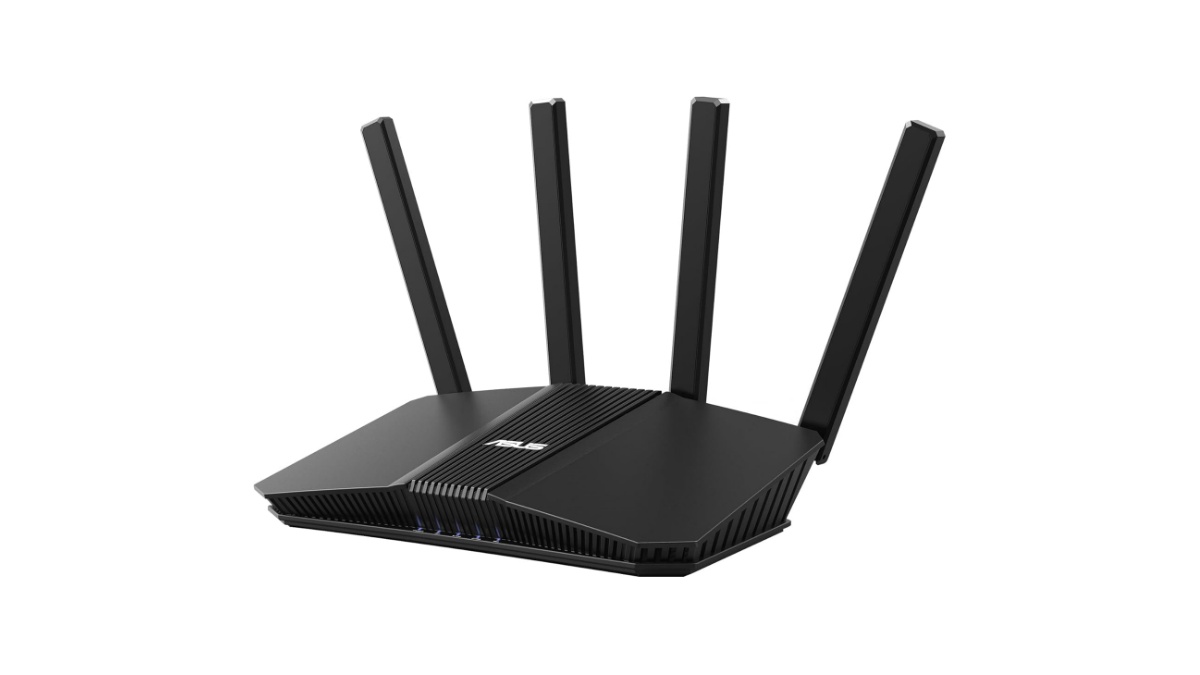
In addition to low-end products that have a large market share, the mid-range of WiFi 6 routers between the AX3000 and AX6000, also has a significant market share. Given that the price difference between low-end and mid-range products is small, while the specification difference is quite large. Several popular products in this wifi6 mid-range segment are worth considering, including Asus AX3000, and TP-Link AX3000 routers, are they still worth buying amid the emerging of wifi 7 products?
In this article
- Asus AX3000 Routers
- Asus RT-AX58 vs Asus GS-AX3000
- TP-Link AX3000 Routers
- Asus AX3000 vs TP-Link AX3000
- Asus be3600 vs TP-Link
Asus AX3000 Routers
Asus introduced various models of standard and gaming routers, ranging from entry level ax1800, ax3000 routers up to ultimate axe16000 routers leveraging wifi 6/6e standards. Even today, you can find next generation of wifi 7 routers such as Asus RT-BE96U BE19000 and GT-BE25000 wifi 7 routers. Let’s focus on middle range wifi6 segment, Asus ax3000 routers.
You may like to read middle range of mesh wifi7 Asus BT10 vs Deco be75, when you need to upgrade to mesh wifi7 network.
Asus RT-AX58U vs GS-AX3000
In this ax3000 network segment, Asus offers standard RT-AX58u router and Asus ROG GS-AX3000 gaming router.
Take a look at the following spec comparison table. Since both router series are designed with the same ax3000 network segment, there is not much technical difference between the two series except the gaming feature. So if you are a gamer in mind and require entry level gear to support the fast responsive gaming, Asus ROG GS-ax3000 router would be the better choice.


See also Asus vs eero mesh wifi 7, popular dual WAN capable mesh versus built-in Zigbee smart home mesh wifi 7 products.
Aimesh
If this product is your first Asus ax router, if one day you need to cover larger area, you can add Asus AiMesh compliant products such as Asus XD4 mini or higher tier. Aimesh feature assures compatibility with other aimesh products to create whole home network. Or probably you may upgrade to Asus BE3600 router leveraging the latest wifi7 standards.
Table 1 Asus AX3000 Series
| Asus AX3000 Model | Asus RT-AX58U | Asus ROG GS-AX3000 |
| Dual band ax3000 (2402 + 574 Mbps) with AiMesh | Yes | Yes |
| Ethernet Ports: 1Gbps WAN and 4x Gigabit LAN ports | Yes | Yes |
| USB Ports 1x USB 3.2 Gen 1 | Yes | Yes |
| Gaming Feature | Game Boost / Acceleration ROG_First OpenNAT (Game Profile) Gaming Port | Traditional QoS |
| Processor: 1.5GHz Tri-core processor 256 MB Flash + 512 MB RAM | Yes | Yes |
| Price (MSRP) | $179.99 | $ 199.99 |
The listed prices may be much different with current price; the prices are dropped over time. So that’s why opting the product with current wifi7 is recommended, and Asus offers budget-friendly product Asus RT-BE58U leveraging the latest wifi standards (802.11.be). With this Asus be58U, you get better interface including 2.5Gbps WAN port, 4x Gig LAN ports, and total bandwidth is 3,600Mbps (2882Mbps @5GHz + 688Mbps @2.4GHz).
What is Asus competitor in middle range ax3000 routers?
TP-Link AX3000
One of its competitors in this ax3000 network segment is TP-Link which also introduced various models of wifi 6/6e products ranging from entry level ax1800 up to ultimate ax16000. Even TP-Link becomes the pioneer in unveiling consumer routers based on latest generation of wifi standards (802.11.be) including Archer BE900 wifi-7 router and Deco BE63 mesh wifi-7.
TP-Link’s most popular AX3000 WiFi 6 router is the Archer AX55. This model comes in two variants: standard and pro. The main difference is that the pro version has a 2.5 Gbps WAN port instead of 1Gbps.
See also legacy Deco X60 vs Orbi, middle range of wifi6 mesh.
TP-Link AX3000 or Archer BE3600
You might be wondering whether you should consider the older TP-Link AX3000 or the new Archer BE3600 that utilizes the latest WiFi 7 standards.
First, you can consider the technology used in the product. The Archer AX3000 is based on the older WiFi 6 standards, while the Archer BE3600 uses the latest standard (WiFi 7). Investing in the BE3600 means being one step ahead technologically compared to the Archer AX3000.
Port Interfaces
Unlike the Archer AX3000, the Archer BE3600 is equipped with a multi-Gig port, a 2.5G WAN port, and a 2.5G LAN port in addition to three 1G LAN ports. This makes the BE3600 ready for future multi-Gig internet speed upgrades, especially when DOCSIS 4.0 cable infrastructure is ready to be implemented.
Table 2 Archer ax3000 vs be3600
| TP-Link Model | TP-Link Archer AX55 | TP-Link BE3600 |
| Wifi Segment | Dual band AX3000 wifi 6 | Dual band BE3600 wifi 7 |
| Signal rates | 2402Mbps @5GHz 574 Mbps @2.4GHz | 2882Mbps @5GHz 688Mbps @2.4GHz |
| Ethernet Ports | 1x 1G WAN 4x 1G LAN | 1x 2.5G WAN 1x 2.5G LAN 3x 1G LAN |
| USB Ports | 1x USB 3.0 | 1x USB 3.0 |
| Price | $80.00 | $119.99 |
Price point gap is not too large; meaning spending slightly more bucks for investing be3600 would be more advantage than older model ax3000. Click the product’s link below to learn more details on see the current price and best deal on Amazon.
Click here for Archer AX3000 on Amazon (#Ad)
Now we return to the initial topic, asus ax3000 or TP-Link AX3000 router, or should we switch to latest wifi 7 routers.
Asus ax3000 vs TP-Link
If you stick with the wifi 6 router models, let’s take a look at the differences in the specs between Asus AX3000 and Arcer ax3000 as shown on the table 3 below.
Archer AX55 pro comes with 2.5Gbps WAN port which is ready for future internet speed upgrade. While Asus only comes with 1G WAN port and 4x 1G LAN ports, so in the future if you require internet speed upgrade up to 2G, you cannot.
The other spec difference is the processing speed. Asus RT-AX58U comes equipped with tri-core as opposed to only dual core on Archer AX55 Pro. In terms of processor performance, Asus AX3000 is the better choice.
Table 3 Asus ax3000 vs archer
| AX3000 model | Asus RT-AX58 | Archer AX55 Pro |
| Wifi segment | Dual band ax3000 (574 Mbps @2.4GHz; 2402 Mbps @5GHz) | Dual band ax3000 (574 Mbps @2.4GHz; 2402 Mbps @5GHz) |
| Ethernet Ports | 4x Gigabit LAN; 1x Gigabit WAN | 1x 2.5 Gigabit WAN/LAN Port 1x Gigabit WAN/LAN Port 3x Gigabit LAN Ports |
| USB ports | 1x USB 3.1 Gen 1 | 1x USB 3.0 port 1x USB 2.0 Port |
| Processor | 1.5 GHz tri-core processor with Memory 256 MB Flash 512 MB RAM | Dual core Qualcomm processor |
| Price | $179.99 | $144.99 |
The price point for each of the ax3000 product is slightly different. What about the entry level of wifi7 routers offered by both vendors? Should you switch or upgrade your legacy devices to wifi7?
See also high speed Asus axe11000 vs Netgear raxe500, previous models of wifi 6e standalone routers.
Asus BE3600 vs Archer
The entry level of wifi7 segment is be3600; most networking vendors introduce this entry level products including Asus with its rt-be58u, and tp-link with its archer be230 wifi7 routers. Wifi7 with its nature MLO (Multi link operation) feature is powerful. It allows a single device to connect simultaneously across multiple frequency bands. The previous wifi standards don’t have this kind of MLO feature.


Take a look at the following table 4 that represents spec comparison table between asus rt-be58u and archer be230 routers. Both are dual band be2300 entry level of wifi7 standalone routers on the market.
Ethernet Ports
Both products support multi-gig Internet connection with their 2.5Gbps WAN port. Unlike Asus, Archer be230 is embedded with 2.5Gbps LAN port. However, with internet connection under 1Gbps speed, you can enable the 1Gbps WAN port for internet connection and 2.5Gbps port as LAN port.
So in terms of LAN port, Archer is more advantage when you subscribe multi-gig internet speed up to 2G. so you still have one 2.5G LAN port for high speed NAS or other wired LAN connected devices.

Dual WAN
Both asus be3600 and TP-Link routers come equipped with USB 3.0 port for storage share. However, Asus rt-be58u allows you to connect USB 4g/5g dongle for secondary Internet connection in either Failover or load balance configuration.
Table 4 Asus be3600 vs Archer
| Model | Asus RT-BE58U | TP-Link Archer BE230 |
| Wifi segment | Dual band be3600 with Aimesh support | Dual band be3600 with Easymesh support |
| Signal rates | 2882Mbps @5GHz 688Mbps @2.4GHz | 2882Mbps @5GHz 688Mbps @2.4GHz |
| Ethernet Ports | 1x 2.5G for WAN/LAN, 1x 1G for WAN/LAN, 3 x 1G LAN, | 1x 2.5Gbps WAN Port 1x 2.5Gbps LAN port 3x 1G LAN ports |
| USB Ports | 1x USB 3.2 Gen 1. 4G/5G mobile Tethering USB storage share | 1x USB 3.0 Storage share |
| Dual WAN supports | Yes, | N/A |
| Processor | 2.0 GHz quad-core processor Memory: 256 MB Flash; 1 GB RAM | Next generation of 2.0 Quad core processor |
| Security | AiProtection and advanced VPNs | TP-Link Homeshield |
| Price | $129.99 | $119.99 |
Prices gap for wifi 6/6e products and wifi 7 products are not large, just slightly difference. So, it is recommended to switch to latest generations of wifi7 products instead of legacy ones. This will assure compatibility with other compliant connected devices that will be coming on the future.
Prices listed may not be current, click the product’s link to see current price on Amazon and learn more manufacturer’s description.
- Click here to SHOP Asus RT-BE58U on Amazon (#Ad)
- Or you may like to Click here for Archer BE3600 on Amazon (#Ad)
Related products
For legacy powerline backhaul products, you may like to see Asus XP4 and Deco P9 mesh wifi 6 with Powerline backhaul.
For webcam requirement, consider the popular and budget friendly 4k webcams, Click here for Nexigo vs Logitech 4k webcams.

